
Spectacle How-To

February 3, 2026
B2B Revenue Attribution Software: The Complete Buyer's Guide
Vincent Gaemers
On this page
Marketing attribution has a credibility problem.
Every platform claims to show "which campaigns drive revenue." But most just track leads and conversions — proxy metrics that may or may not correlate with actual business outcomes.
True revenue attribution connects marketing touchpoints to actual payments. It follows the customer journey from first click to closed deal to recurring revenue. It tells you which campaigns generate customers with the highest lifetime value, not just which campaigns generate the most form fills.
This guide covers everything you need to evaluate B2B revenue attribution software: what to look for, what to avoid, how to compare vendors, and how to implement successfully.
What B2B Revenue Attribution Actually Means
Let's define terms clearly:
Marketing attribution: Connecting marketing touchpoints (ad clicks, content views, emails) to conversion events (form fills, demo requests, trial signups).
Revenue attribution: Connecting marketing touchpoints to actual revenue — payments received, not just deals closed or conversions recorded.
B2B revenue attribution: Revenue attribution designed for B2B sales cycles — long timelines, multiple stakeholders, complex buying journeys.
The distinction matters. Most "attribution" tools stop at conversions. You see which campaigns drove form submissions, but not which campaigns drove customers who actually paid — or how much they're worth over time.
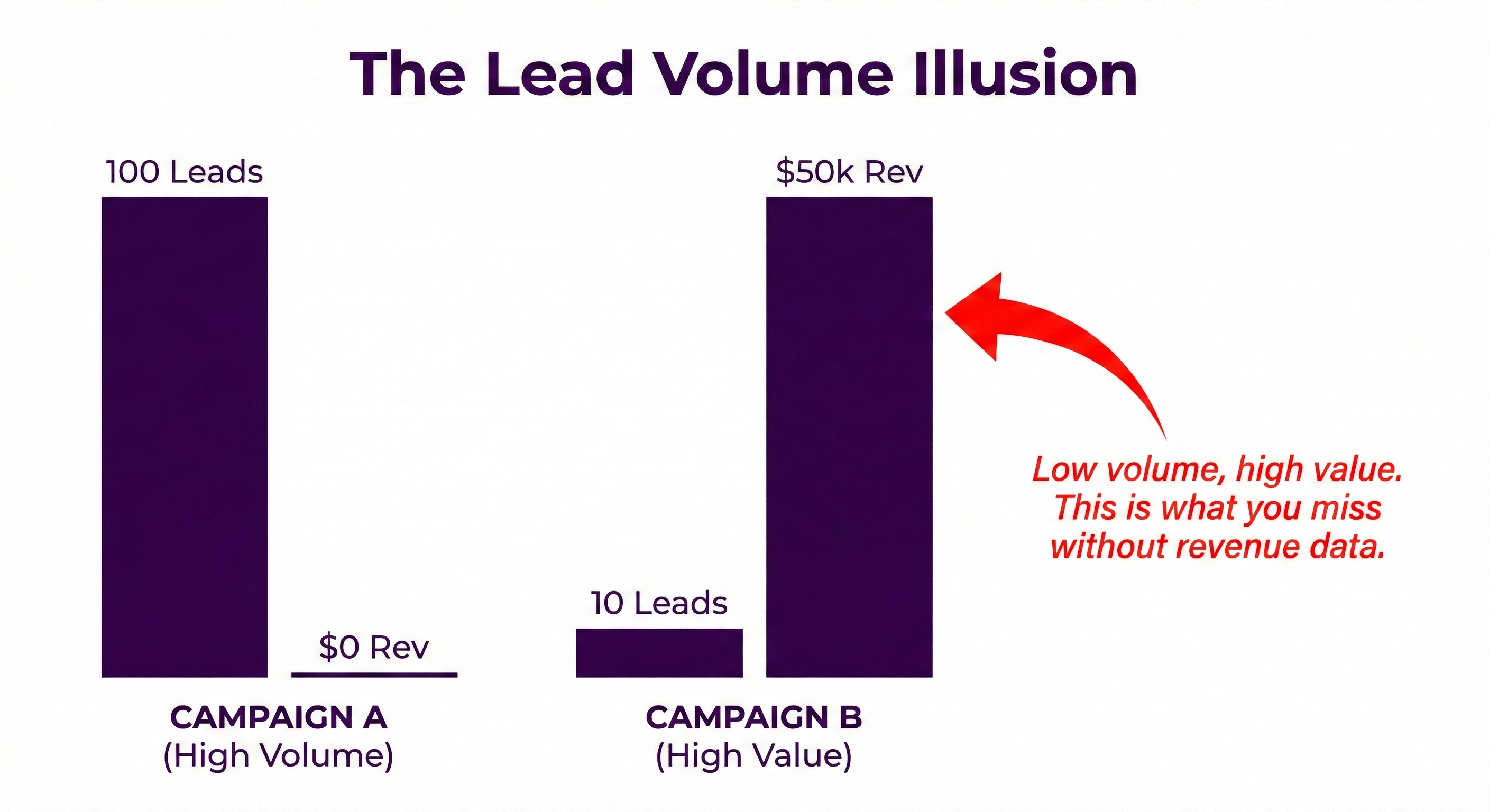
For B2B companies, this gap is critical. A campaign generating 100 cheap leads that never buy looks better than a campaign generating 10 expensive leads that become your largest customers. Without revenue data, you optimize for the wrong thing.
Why B2B Attribution Is Different
B2B sales have characteristics that break consumer-focused attribution models:
Long Sales Cycles
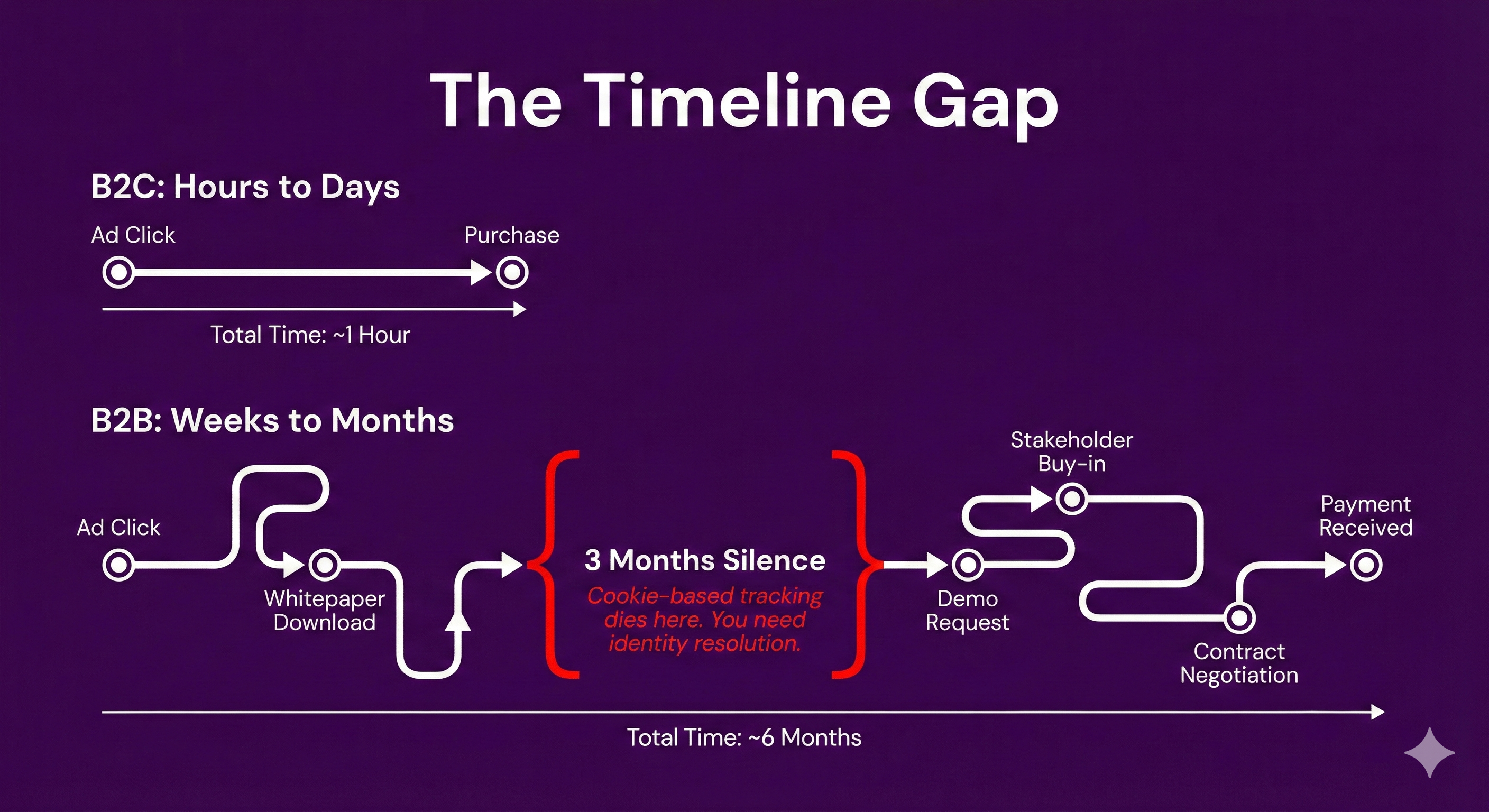
B2B purchases take weeks to months, not hours. A prospect might click an ad in January and close in June. Cookie-based attribution loses this journey.
Multiple Stakeholders
B2B buying committees involve 6-10 people. The person who clicks your ad isn't necessarily the person who signs the contract. Attribution must work at the account level, not just individual level.
High-Value Transactions
B2B deals are worth thousands to millions. Getting attribution right directly impacts budget allocation at meaningful scale.
Complex Journeys
Prospects engage through multiple channels: ads, content, events, sales calls, product trials. Attribution must connect touchpoints across the full journey.
Relationship Between Marketing and Sales
B2B revenue involves both marketing and sales efforts. Attribution should show marketing's contribution to deals that sales closes.
Standard attribution tools built for ecommerce or B2C don't handle these realities. You need software designed for how B2B actually works.
Key Features to Evaluate
When comparing B2B revenue attribution platforms, evaluate these capabilities:
1. Multi-Touch Attribution Models
The platform should offer multiple attribution models:
- First-touch: 100% credit to first interaction
- Last-touch: 100% credit to last interaction
- Linear: Equal credit across all touchpoints
- Time decay: More credit to recent touchpoints
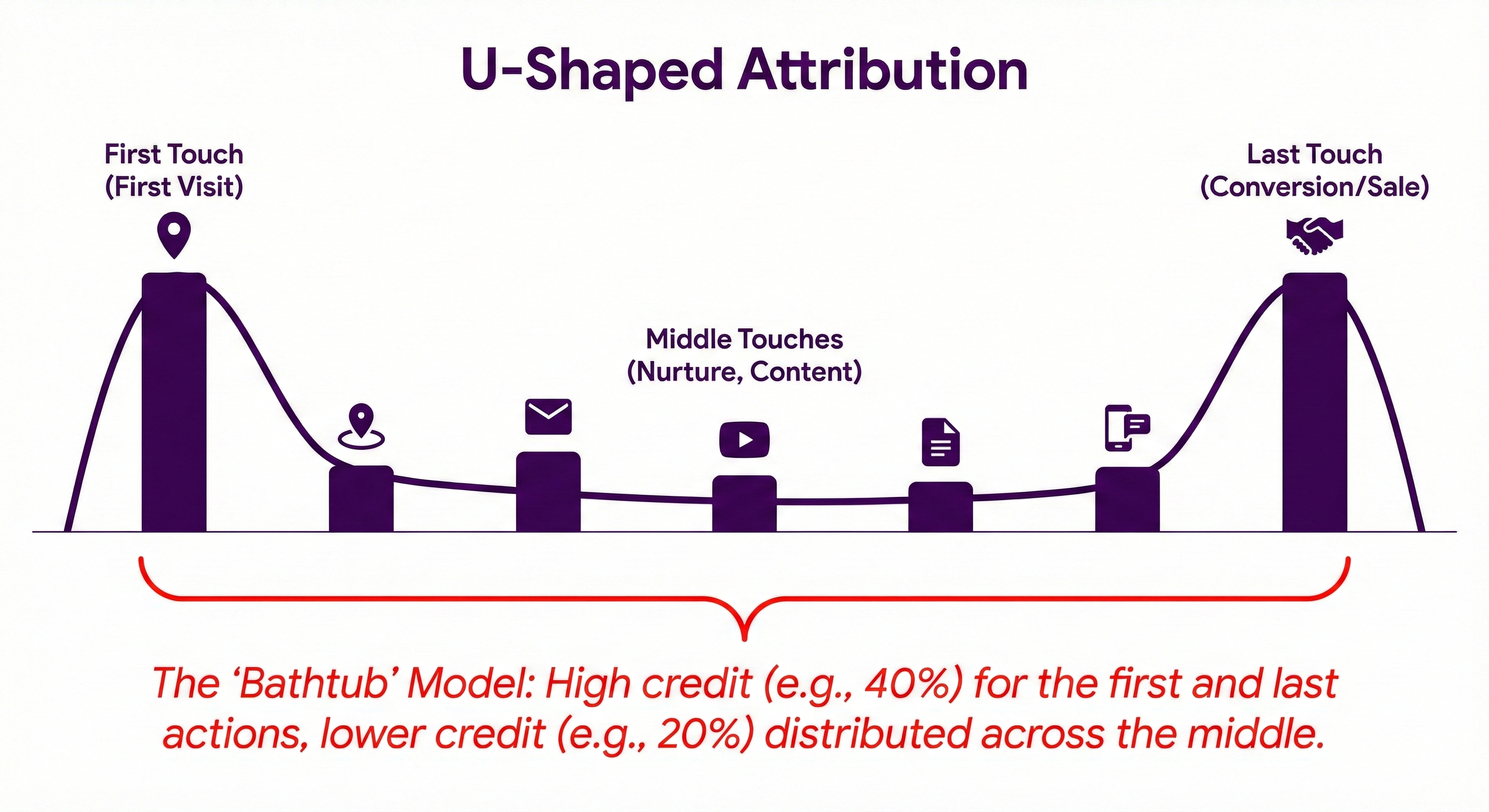
- Position-based (U-shaped): 40% first, 40% last, 20% middle
- W-shaped: Credit to first touch, lead creation, deal creation
- Custom: Define your own credit distribution
No single model is "correct." You need flexibility to view data from multiple angles.
2. Account-Level Attribution
For B2B, individual-level attribution isn't enough. The platform should:
- Group contacts from the same company
- Aggregate touchpoints across the buying committee
- Show account-level journey and influence
- Attribute revenue to the account, with visibility into which contacts engaged
3. CRM Integration
Deep CRM integration is essential:
- HubSpot, Salesforce, Pipedrive — major CRMs should integrate natively
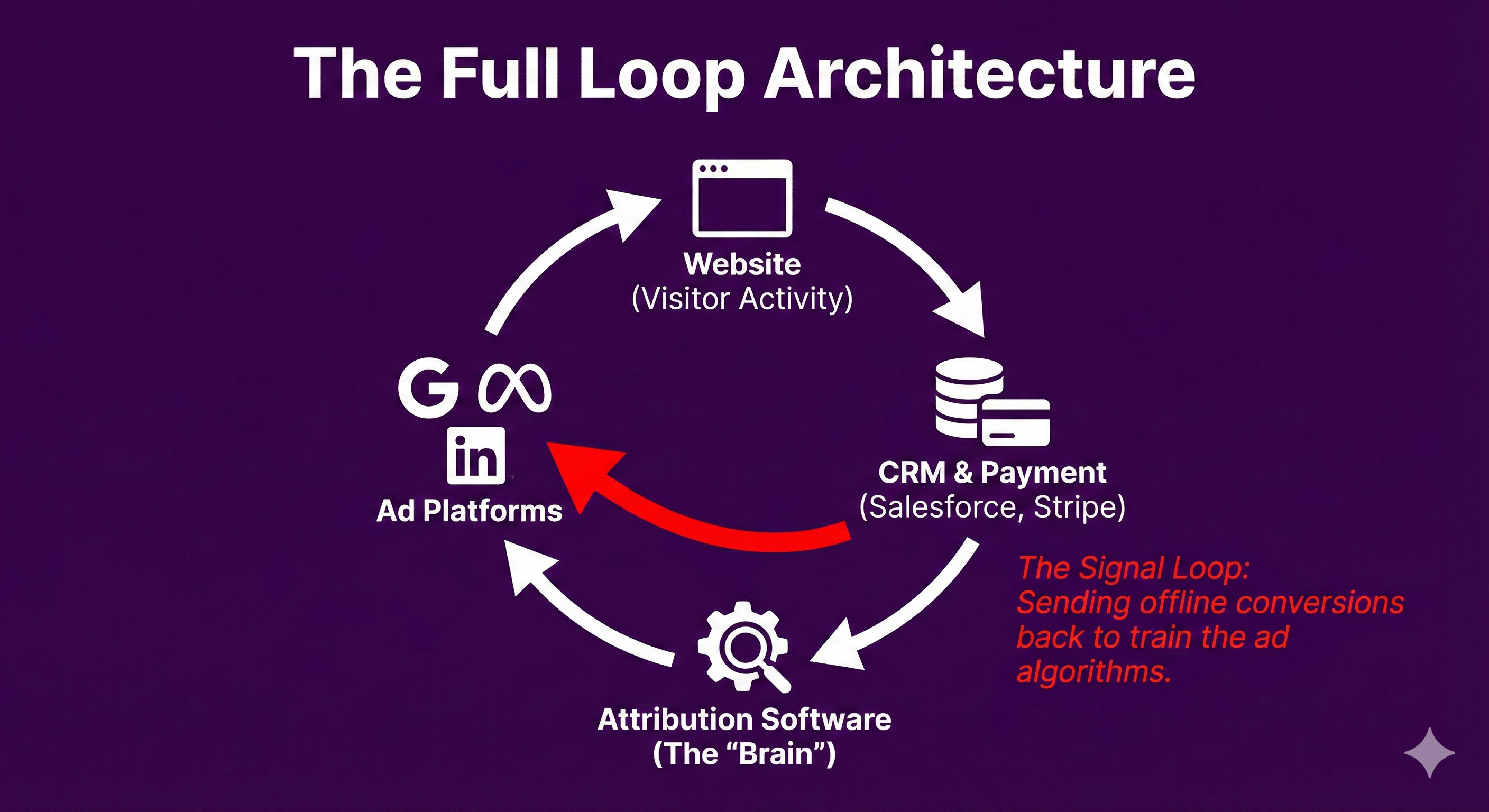
- Bi-directional sync — pull data from CRM, push insights back
- Deal and pipeline tracking — capture deal stages, values, close dates
- Contact and company data — connect marketing touchpoints to CRM records
Without CRM integration, you can't connect marketing to sales outcomes.
4. Payment Processor Integration
True revenue attribution requires payment data:
- Stripe, Chargebee, Paddle, Recurly — direct integration with payment processors
- Actual payments — track when money actually moves, not just when deals close
- Recurring revenue — capture MRR/ARR accumulation over time
- Refunds and churn — attribute negative revenue appropriately
Deal amounts are estimates. Payment data is truth.
5. Ad Platform Connections
The platform should connect to your ad platforms:
- Google Ads, Meta, LinkedIn, Microsoft, TikTok — all major networks
- Cost data import — pull spend data for ROI calculation
- Conversion sync — send revenue events back to ad platforms
- Audience building — create audiences from CRM segments
Bi-directional sync is key. Pulling data in isn't enough — you need to push conversion signals back so ad platforms can optimize.
6. Server-Side Tracking
Client-side JavaScript tracking is increasingly unreliable due to:
- Ad blockers (30-40% of B2B visitors)
- iOS tracking restrictions
- Cookie limitations
- Browser privacy features
Server-side tracking sends conversion data directly between servers, bypassing browser limitations. Your platform should support:
- Offline conversion import to Google Ads
- Conversions API (CAPI) for Meta
- Server-side events for LinkedIn and others
7. Visitor Identification
Understanding who visits your site before they convert:
- First-party cookie tracking — identify returning visitors
- IP-to-company resolution — reveal company names from anonymous traffic (some platforms offer this)
- Cross-device tracking — connect journeys across devices where possible
- Identity stitching — link anonymous sessions to known contacts after identification
8. Reporting and Dashboards
Useful reporting capabilities include:
- Revenue by channel/campaign/keyword — the core attribution view
- CAC calculation — cost to acquire customers by source
- LTV analysis — lifetime value by acquisition channel
- Payback period — time to recover acquisition cost
- Journey visualization — see touchpoint paths
- Cohort analysis — performance over time by acquisition cohort
9. Implementation Requirements
Understand what implementation involves:
- JavaScript tracking script — typically required on all pages
- Code changes — some platforms require developer work for event tracking
- API integration — deeper integrations may require API configuration
- Time to value — how long until you see useful attribution data
Some platforms set up in minutes. Others require weeks of implementation. Know what you're signing up for.
Red Flags to Watch For
Avoid platforms with these characteristics:
"AI-Powered" Attribution Without Transparency
AI and machine learning can improve attribution. But if you can't understand how credit is assigned, you can't trust the results. Ask vendors to explain their methodology.
No Direct Payment Integration
If "revenue attribution" means pulling deal amounts from CRM, you're not getting actual revenue. Look for direct payment processor connections.
Excessive Implementation Time
If a platform takes 3-6 months to implement, it's designed for enterprise with dedicated ops teams. Make sure that matches your resources.
Pricing Hidden Until Sales Call
Opaque pricing often means enterprise-level costs. If you can't see a price range, expect quotes above $2,000/month.
Only Last-Touch or First-Touch
Basic attribution tools only offer single-touch models. For B2B with complex journeys, you need multi-touch options.
No Server-Side Tracking
If the platform only offers client-side (JavaScript pixel) conversion tracking, you'll lose significant data to ad blockers and iOS restrictions.
Build vs. Buy Decision
Should you build attribution in-house or buy a solution?
When to Build
Consider building if:
- You have a dedicated data engineering team
- You have unique requirements no vendor can meet
- You need deep customization of attribution models
- Data warehouse integration is your primary workflow
- You have 6+ months runway for the project
When to Buy
Buy an attribution solution if:
- You need attribution working in weeks, not months
- You don't have dedicated data engineering resources
- Standard attribution models meet your needs
- You want vendor support and maintenance
- The cost of building exceeds the cost of buying (usually the case)
Build Costs Often Underestimated
Building attribution seems simple but involves:
- Data pipeline engineering (ad platforms, CRM, payments)
- Identity resolution across touchpoints
- Attribution model implementation
- Dashboard and reporting development
- Ongoing maintenance as platforms change APIs
- Supporting new ad platforms and integrations
Most companies underestimate this by 3-5x. Unless you have clear reasons to build, buying is usually more cost-effective.
How to Compare Vendors
Step 1: Define Your Requirements
Before evaluating, clarify:
- Which CRM do you use?
- Which ad platforms do you run?
- Which payment processor handles your revenue?
- What's your budget range?
- Who will own the platform (marketing ops, data team, marketing lead)?
- What's your acceptable implementation timeline?
Step 2: Create a Shortlist
Based on your requirements, identify 3-5 vendors to evaluate. Categories:
Enterprise ($2,000+/month):
- Dreamdata
- HockeyStack
- Bizible (Adobe Marketo Measure)
- CaliberMind
Mid-Market ($200-2,000/month):
- Spectacle
- Attribution (Leadsrx)
- SegMetrics
SMB/Startup (Under $200/month):
- Spectacle
- Fibbler
- GA4 + manual integration
- CRM-native attribution (if sufficient)
Step 3: Evaluate Against Criteria
For each vendor, assess:
| Criteria | Weight | Vendor A | Vendor B | Vendor C |
| CRM integration (yours) | High | |||
| Payment processor integration | High | |||
| Ad platform support | High | |||
| Multi-touch models | Medium | |||
| Account-level attribution | High (B2B) | |||
| Server-side tracking | Medium | |||
| Implementation time | Medium | |||
| Pricing | Varies | |||
| Support and documentation | Low |
Step 4: Run Proof of Concept
Before committing, test with real data:
- Connect your actual ad accounts
- Install tracking on your site
- Let data collect for 1-2 weeks
- Validate attribution makes sense
- Check data quality and completeness
Most vendors offer trials or POC periods. Use them.
Step 5: Negotiate and Contract
When you've chosen a vendor:
- Ask about annual discounts (typically 15-20%)
- Clarify usage limits and overage costs
- Understand contract length and exit terms
- Document implementation support included
- Get clear timelines for going live
Implementation Best Practices
Start with Clean Data
Attribution is only as good as your input data:
- Consistent UTM tagging — standardize source, medium, campaign naming
- CRM hygiene — deals linked to contacts, accurate deal values
- Payment processor setup — customer emails match CRM records
Connect Everything Before Analyzing
Don't draw conclusions until all data sources are connected:
- Website tracking installed
- CRM connected and syncing
- Ad platforms connected
- Payment processor connected
Partial data gives misleading attribution.
Define Your Conversion Events
Clearly define what you're attributing:
- Lead creation — form fill, signup, demo request
- Opportunity creation — sales-qualified opportunity
- Closed-won deal — contract signed
- First payment — actual revenue received
- Recurring payments — ongoing revenue
Different events tell different stories. Track all that matter.

Set Realistic Expectations
Attribution takes time to provide value:
- Week 1-2: Data starts flowing, but limited history
- Month 1: Enough data to see patterns
- Month 2-3: Confident enough for budget decisions
- Month 3+: Historical comparisons and trend analysis
Don't expect instant insights. Let data accumulate.
Communicate with Stakeholders
Attribution data changes narratives. Prepare stakeholders:
- Share methodology and limitations
- Explain why numbers differ from platform-reported data
- Set expectations about what attribution can and can't prove
- Use attribution to inform decisions, not as absolute truth
Common Attribution Pitfalls
Over-Relying on Last Touch
Last-touch attribution is simple but misleading. It gives 100% credit to the final interaction, ignoring everything that influenced the journey before.
For B2B with long sales cycles, last touch dramatically undervalues awareness and nurture campaigns.
Ignoring Dark Funnel
Not every touchpoint is trackable. Prospects:
- Google you but don't click (brand awareness)
- Read content shared by colleagues (word of mouth)
- Attend events without tracking (offline influence)
- See your ads without clicking (view-through impact)
Attribution shows tracked touchpoints. It doesn't capture everything. Treat it as directional, not absolute.
Waiting for Perfect Data
You'll never have perfect attribution data. Waiting for perfection means never using attribution at all.
Start with what you can track. Improve over time. Imperfect attribution beats no attribution.
Not Acting on Insights
Attribution is useless if you don't change behavior. When attribution shows:
- A channel underperforming → reduce spend or optimize
- A campaign overperforming → increase investment
- Certain keywords driving LTV → bid more aggressively
If you're not making decisions based on attribution, why pay for it?
Metrics That Matter
Focus on these metrics from your attribution platform:
Customer Acquisition Cost (CAC) by Channel
Total spend / customers acquired = CAC
Calculate separately for each channel to identify efficiency.
Lifetime Value (LTV) by Source
Average revenue per customer over their lifetime, segmented by acquisition source.
Some channels attract higher-value customers. Know which ones.
LTV:CAC Ratio by Channel
LTV divided by CAC. A healthy ratio is 3:1 or higher.
Channels below 3:1 may not be sustainable. Channels above 5:1 might warrant more investment.
Payback Period
Months until customer payments cover acquisition cost.
Critical for cash flow planning. Shorter payback = more sustainable growth.
Pipeline Influenced
Total deal value where marketing touchpoints appeared in the journey.
Useful for showing marketing's contribution to sales pipeline.
Revenue Attributed
Total closed revenue attributed to marketing, using your chosen attribution model.
The headline metric for proving marketing ROI.
Vendor Landscape Overview
Enterprise (>$2,000/month)
Dreamdata — Strong B2B focus, account-level attribution, audience activation. Free tier available, paid starts ~$750/month.
HockeyStack — AI-powered insights, unified GTM data, cookieless tracking. Starts ~$2,200/month.
Bizible (Adobe Marketo Measure) — Deep Adobe/Marketo integration, enterprise compliance. Custom pricing, typically $2,000+/month.
Mid-Market ($100-2,000/month)
Spectacle — Revenue attribution for SaaS, direct Stripe integration, fast setup. Starts $99/month.
SegMetrics — Marketing automation focused (Infusionsoft, ActiveCampaign), email attribution. Starts ~$175/month.
Attribution (Leadsrx) — Multi-channel including offline (TV, radio). Custom pricing.
CRM-Native Options
HubSpot Attribution — Available on Marketing Hub Enterprise. Good starting point if already on HubSpot.
Salesforce Campaign Influence — Basic attribution within Salesforce. Requires manual campaign association.
DIY Approach
GA4 + Data Warehouse + BI Tool — Build your own with free tools and engineering effort. High customization, high maintenance.
Summary: How to Choose
- Define requirements: CRM, payment processor, ad platforms, budget, timeline
- Shortlist vendors: Match requirements to vendor capabilities
- Evaluate deeply: Test with real data, not just demos
- Implement properly: Clean data in, all sources connected
- Act on insights: Attribution without action is wasted
The right attribution tool depends on your stack, budget, and resources — not just feature lists. A simpler tool you actually use beats a complex tool you struggle to implement.
Start with what you can execute. Improve as you grow. Revenue attribution is a capability you build over time, not a one-time purchase.
Try Spectacle
If you're looking for B2B revenue attribution that's fast to set up and connects to actual payments, try Spectacle free for 14 days.
- Direct Stripe, integration
- HubSpot, Salesforce, and Pipedrive, Odoo, Active Campaign, Monday CRM, CRM connections
- Calendly Integration
- Multi-touch attribution models
- Server-side sync to Google Ads, Meta, LinkedIn
- Setup in minutes, not months
No credit card required.
Latest insights