
App Release

July 9, 2025
Spectacle Hubspot Integration: Multi Channel attribution for CRM
Vincent Gaemers

On this page
Overview
This guide walks you through connecting your HubSpot CRM to Spectacle so you can measure marketing performance by actual revenue and customer outcomes rather than just leads and website activity.
Why connect HubSpot to your attribution
Most attribution tools stop tracking at the initial conversion—when someone fills out a form or starts a trial. For B2B companies, this misses the most important part of the story: which marketing activities actually drive paying customers.
HubSpot contains the real narrative of your customer journey. Contacts become marketing qualified leads, progress to sales qualified opportunities, and eventually close as revenue. By connecting this CRM data to your marketing attribution, you can see which campaigns influence actual customers rather than just curious visitors.

How the integration works
The integration creates a secure, read-only connection between HubSpot and Spectacle. No data gets written back to your CRM—Spectacle only pulls information to enrich your attribution reports.
Identity resolution and session stitching
When HubSpot contacts sync to Spectacle, the system automatically matches email addresses to existing anonymous website sessions. This connects every anonymous page view, ad click, and content download to the actual person who eventually became a customer.
Account-based attribution
Spectacle groups individual contacts by their HubSpot company associations. When multiple people from the same company interact with your marketing, all those touchpoints get credited toward eventual deal outcomes. This is crucial for B2B attribution where purchasing decisions involve multiple stakeholders.
Revenue tracking
Deal amounts and close dates flow from HubSpot into Spectacle, enabling true ROI calculations. Instead of measuring campaign success by lead volume, you can see actual revenue generated by each marketing channel and campaign.
What data gets synced
Supported Data Objects
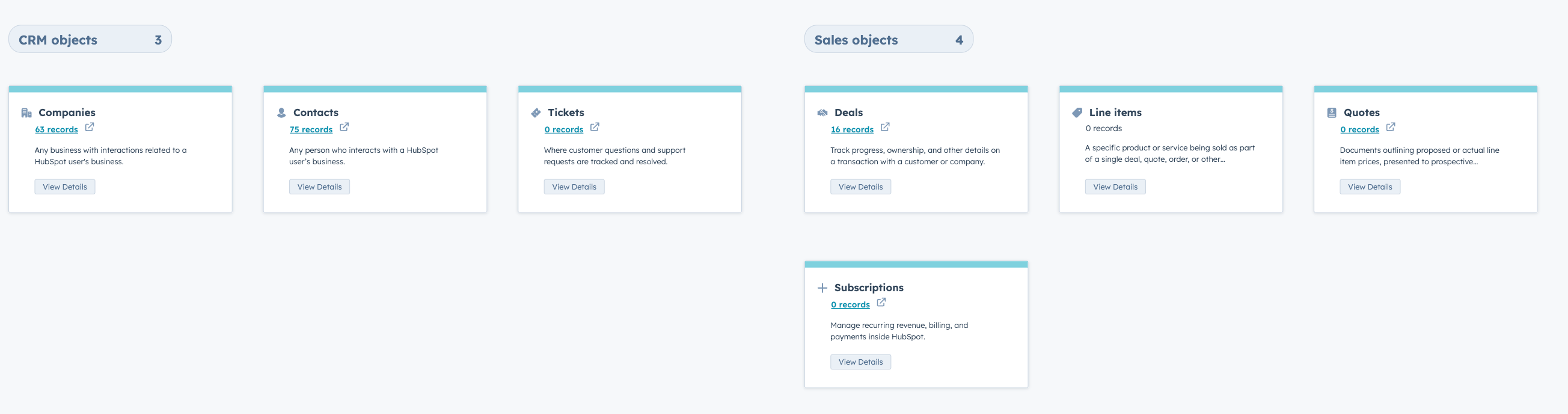
Spectacle is able to interact with all Hubspot packages: starter, professional and enterprise.
We use the following data in Spectacle using Hubspot webhooks:
Contacts
Connects anonymous website sessions to known HubSpot contacts using email addresses and tracking identifiers. This creates complete user journeys from first visit to deal closure.
| Field Type | Example | Spectacle Use case |
|---|---|---|
| Identity fields | Email, first name, last name, HubSpot ID | Session stitching and user identification |
| Lifecycle data | Lifecycle stage, lead status, contact owner | Journey mapping and conversion analysis |
| Acquisition data | Original source, UTM parameters, first page seen | Source attribution and campaign tracking |
| Custom properties | Job title, company size, product interest | Audience segmentation and personalization |
Companies
Groups individual contacts by HubSpot company associations, enabling account-based attribution reporting. All campaign touchpoints that influence any company contact are credited toward deal outcomes.
| Field Type | Example | Spectacle Use case |
|---|---|---|
| Firmographic data | Company name, domain, industry, employee count | Account-based attribution and filtering |
| Revenue data | Annual revenue, plan tier, contract value | Value-based segmentation and LTV analysis |
| Engagement data | Last activity date, HubSpot score, lifecycle stage | Account health and engagement scoring |
| Custom properties | (Technology stack, budget, decision timeline | Advanced targeting and segmentation |
Deals
Uses any HubSpot property as a filter dimension in Spectacle. Create audiences based on lifecycle stage, company size, deal value, or custom properties.
| Field Type | Example | Spectacle Use case |
|---|---|---|
| Pipeline data | Deal stage, pipeline, probability, owner | Sales velocity and conversion tracking |
| Financial data | Deal amount, close date, deal type | Revenue attribution and ROI calculation |
| Source data | Deal source, campaign attribution | Campaign performance measurement |
| Custom properties | Deal priority, contract length, renewal date | Custom reporting and analysis |
Associations
| Field Type | Use Case | Purpose | Result |
|---|---|---|---|
| Company-Contact Associations | Groups contacts by company using HubSpot's company associations | Enables account-level insights and company-level attribution | Individual conversions roll up to company-level metrics |
| Contact-Deal Associations | Connecting contacts to their associated deals | Revenue attribution and ROI calculations | Track which contacts influenced which deals |
| Company-Deal Associations | Attributing deal revenue to all touchpoints across the buying committee | B2B attribution across multiple stakeholders | Complete view of multi-person, multi-touch B2B sales cycles |
Revenue
Pulls deal amounts and close dates from HubSpot to calculate true campaign ROI. Attribution reports show revenue generated, not just lead volume.
Key Features
Session Stitching
Company-Level Attribution
Revenue Tracking
Pulls deal amounts and close dates from HubSpot to calculate true campaign ROI. Attribution reports show revenue generated, not just lead volume. When "Track Payments" is enabled, Spectacle tracks these payment events:
- Payment Succeeded
- Tracks positive revenue when payments process successfully
- Payment Failed
- Records failed payment attempts (no revenue impact)
- Payment Refunded
- Tracks negative revenue for refunded payments
- Dispute Won
- Maintains revenue when disputes are resolved favourably
- Dispute Lost
- Tracks negative revenue when disputes are lost
Advanced Segmentation
Setup Process
You'll need an active HubSpot account with contacts, companies, and deals data, plus a Spectacle account with integration permissions.
Configuration Steps
1. Navigate to Integrations
- Go to Settings → Integrations in your Spectacle dashboard
- Select HubSpot from the available integrations
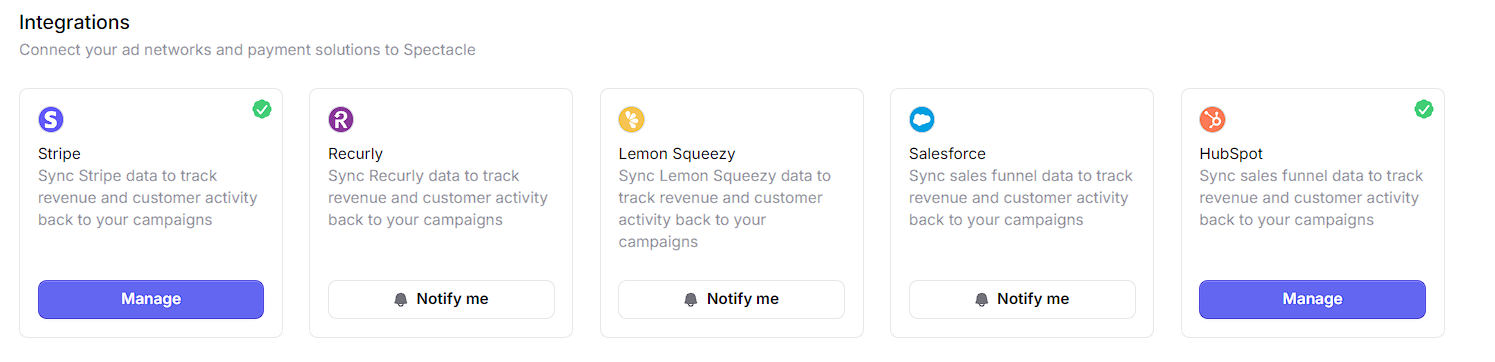
2. Authorize Connection
- Click "Connect HubSpot"
- Log in to your HubSpot account
- Grant Spectacle read permissions for Contacts, Companies, and Deals
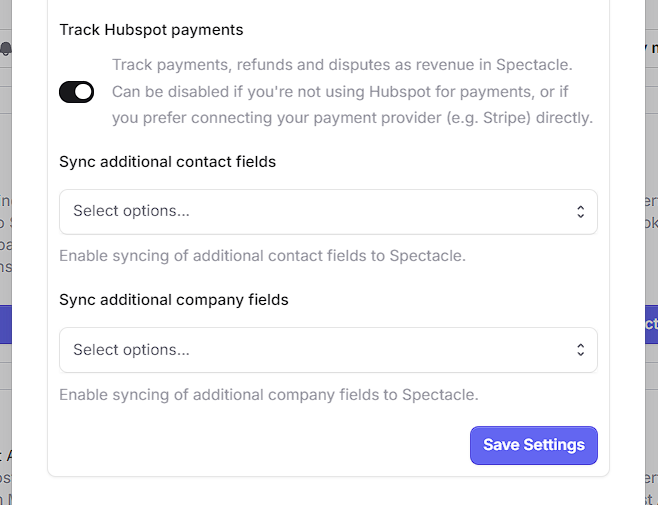
3. Select Properties
- Enable Hubspot payments sync for revenue attribution
- Choose which HubSpot properties to sync
- Configure any field mappings if needed
Data Sync Method
Webhook-Based Integration
Spectacle uses HubSpot webhooks to monitor changes in real-time. When contacts update, deals progress, or companies change, HubSpot automatically notifies Spectacle to pull the updated information.
This webhook-based approach ensures your attribution data stays current without unnecessary bulk syncing or API usage. Changes appear in Spectacle within minutes of occurring in HubSpot.
Currently, we are able to ingest data from any of the following objects:
- Contacts - Updates trigger immediate sync of contact data
- Companies - Company changes are captured in real-time
- Deals - Deal stage changes and updates are tracked instantly
- Associations - Changes in contact-company and deal relationships are monitored
- Revenue Events - Payment events are tracked when "Track HubSpot payments" is enabled
How It Works
When any change occurs in these monitored objects, HubSpot sends a webhook notification to Spectacle, which then pulls the updated contact data and any related information. This ensures:
- Real-time data synchronization
- Minimal API usage (only pulling data when changes occur)
- Always up-to-date attribution data
- No unnecessary bulk syncing
Privacy and security
The integration requires only read-only access to your HubSpot data. Spectacle never writes information back to your CRM, and all data is encrypted both in transit and at rest.
You can disconnect the integration at any time, and data retention follows your standard Spectacle account settings. The connection respects all existing HubSpot permission structures and security policies.
Data Handling
- All data is encrypted in transit and at rest
- No data is written back to HubSpot
- Data retention follows your Spectacle account settings
- Integration can be disconnected at any time
Support Resources
Next Steps
Once your HubSpot integration is configured:
- Review Attribution Reports - See how CRM context enhances your campaign insights
- Build Custom Audiences - Create segments based on HubSpot properties
- Set Up Revenue Tracking - Configure deal-based ROI calculations
- Explore Advanced Features - Leverage company-level attribution and multi-touch modelling
Configure HubSpot Integration →
The integration transforms basic website analytics into business-focused attribution that connects marketing activities to actual revenue outcomes. This visibility enables better budget decisions and clearer measurement of marketing's contribution to company growth.
For questions about setup or configuration, contact our support team.
Latest insights