
LinkedIn ads integration
| Feature | Supported |
|---|---|
| Campaign measuring | ✓ |
| Keyword measuring | N/A |
| Ad Spend measuring | ✓ |
| Import LinkedIn ad impressions and engagements | ✓ |
| Automatic tracking configuration | ✓ |
| Audiences: Conversion API (CAPI) syncs | ✓ |
| Audiences: List syncs | ✓ |
| Audiences: Leads from lead forms captured | ✓ |
Measure LinkedIn Ads traffic
Spectacle automatically configures your Linkedin Ads account for tracking. Any existing utm scheme you might have in place is respected and will not be overridden.
Measure LinkedIn Ads ad spend
To measure your LinkedIn Ads spend, please go your workspace's settings page and click the "connect" button on the LinkedIn Ads integration. This will automatically take you to LinkedIn Ads and ask you to connect your account. After connecting your account, Spectacle will import your LinkedIn Ads spend data, starting from the first tracked click for this network.
Import LinkedIn ad impressions and engagements
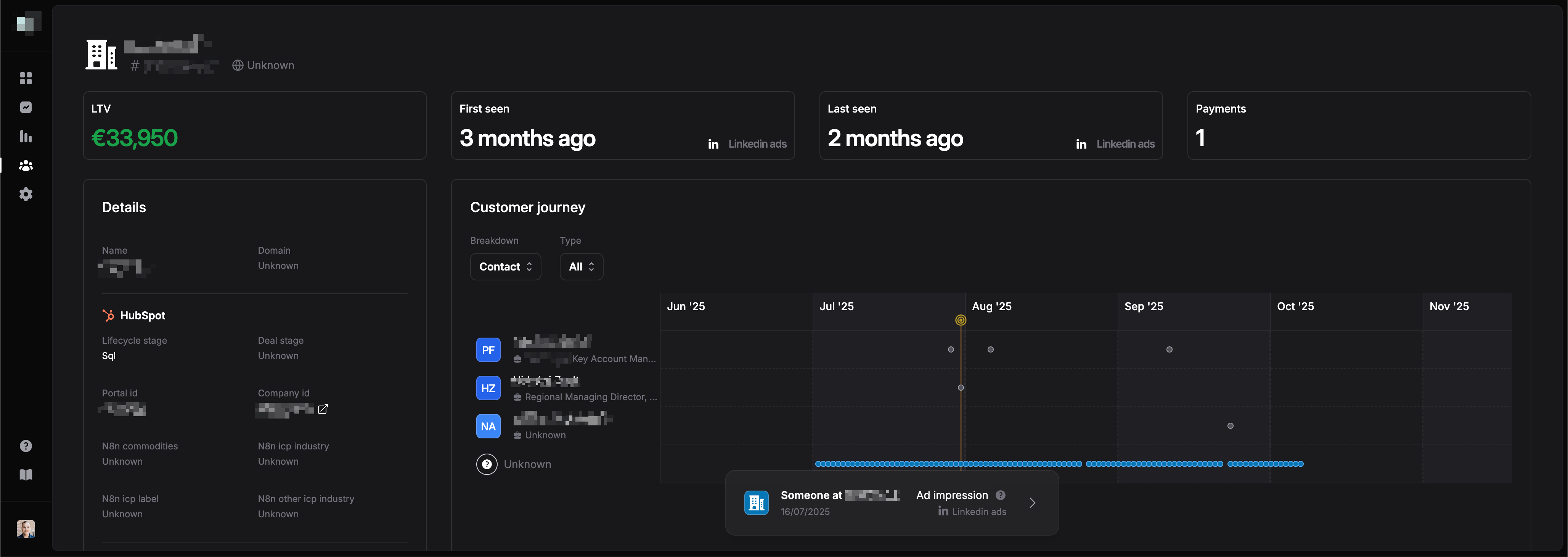
Spectacle automatically imports your LinkedIn Ads impressions and engagements (video views, comments, likes etc..) and considers this data when attributing revenue and LTV. Next to that, Spectacle will show you within customer journeys, when companies saw or engaged with your LinkedIn ads and sponsored content.
Sync audiences to LinkedIn matched audiences
Spectacle keeps your company audiences in sync with LinkedIn as matched audiences, so the accounts you have measured can be targeted — or excluded — in Campaign Manager.
A list sync creates a DMP segment in your LinkedIn ad account and streams the audience's members to it. LinkedIn matches each member to a company page and outputs an audience you can select as targeting on any campaign. From then on the sync runs continuously: companies that enter the audience are added and companies that leave are removed, without anyone rebuilding a list by hand.
What gets shared
LinkedIn matches companies on firmographic identifiers, and scores each match on confidence, so Spectacle sends every identifier it holds for the company:
- Company name
- Website domain
- LinkedIn company page url, built from the company's vanity name
These are business identifiers rather than personal data, so nothing is hashed and no personal data leaves Spectacle for a company list. There is no data sharing choice or consent toggle to configure on a company sync.
Set up a list sync
- Go to Audiences → Syncs and click "New sync"
- Pick your LinkedIn ad account
- Pick the company audience to sync
- Review and confirm
Once the segment is created, open Campaign Manager and select the audience as targeting or as an exclusion on a campaign.
What to expect
- Company audiences only. LinkedIn list syncs currently cover company audiences. Contact audiences can still be sent to LinkedIn as conversion syncs.
- Reconnect once. Matched audiences use a separate LinkedIn permission. Connections authorized before this feature was released need to be reconnected once before a sync can be created — Spectacle prompts you when that applies.
- First match takes a while. LinkedIn can take up to 48 hours to match a new segment for the first time. After that Spectacle's syncs run every few minutes, so changes to the audience reach LinkedIn nearly in real time.
- 300 matched members to serve. LinkedIn will not deliver against an audience with fewer than 300 matched members, even though the list still reports as ready. Spectacle flags a sync that sits below that floor.
- Watch the match rate. The syncs table shows the segment's status and how many of the members you sent LinkedIn managed to match.
- Deleting a sync deletes the segment. LinkedIn removes the audience along with its DMP segment, and any campaign targeting it stops serving. Spectacle warns you before you confirm.
Capture leads from LinkedIn lead gen forms
When your LinkedIn Ads account is connected, Spectacle automatically captures leads submitted through your sponsored lead gen forms. Each captured lead is added to your audience as a contact (with their name and email address), and the submission shows up in the contact's customer journey — so revenue and LTV can be attributed back to the campaign the lead came from.
When the form asks for a company name, Spectacle also stores the submitter's company name (prefilled by LinkedIn from their profile) on the contact.
You can filter contacts that were discovered through LinkedIn lead forms with the "Discovered through" filter on the audience page.
Connections made before this feature was released need to be reconnected once to grant Spectacle access to lead form responses.